
Advanced States Log
The Advanced States Log section adds functionality to the States Log section.
In the main table, you'll find a list of all the states a machine has been in over time, along with additional information related to each state, such as the quantity produced, the number of defective pieces, and the recipes used. Note that the last reported state is not the current one the machine is in but rather the last completed state.
Each state is associated with a cause, namely the event that led to the transition from a previous state to the current one. The policy used to associate a cause with a state change can be of various types and depends on the choices made during the design phase of Edge technologies. The functionality introduced by this section allows for justifications, i.e. manual corrections, to modify the cause associated with the state, ensuring accurate recording of the events that led to the state change. This new option helps overcome inaccuracies due to the use of overly generic or insufficiently elaborate policies.
In the table, you can view both the original cause chosen by the policy for the state change and the cause that the user has manually justified to associate with it.

EXAMPLE
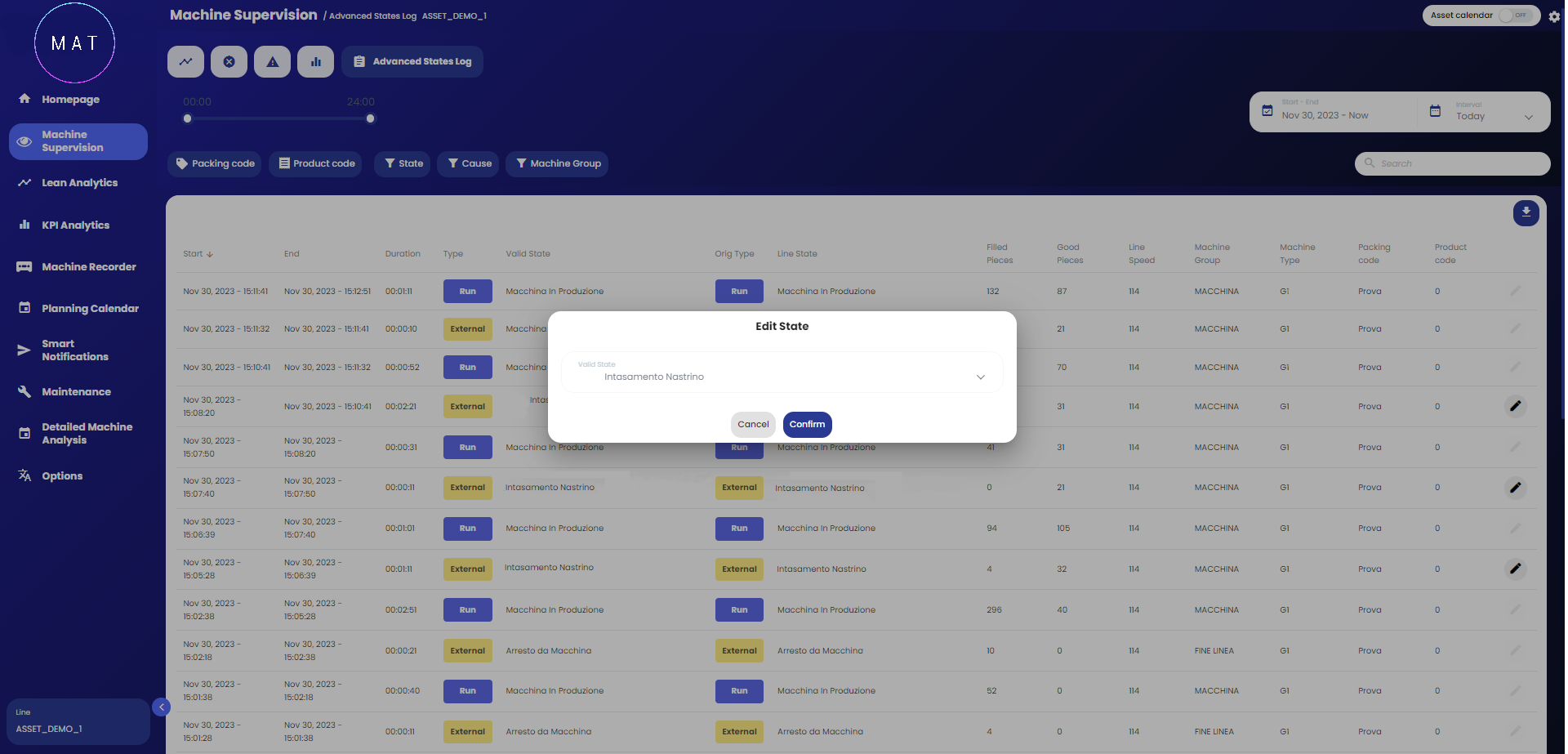
In Image A, an example of an Advanced States Log page is shown. In this case, the column labeled Line State represents the cause that led to the transition to the state indicated in the Orig Type column.
The Valid State column, on the other hand, represents the cause that has been manually justified with the state listed in the Type column. If no cause has been manually modified, then the Line State and Valid State columns coincide.
Note that column names can be defined according to your needs during the application configuration phase.
To justify a cause, you can press the Edit button, shaped like a pencil, located on the right side of each row in the table. A window will open (Image B) containing a dropdown menu listing all possible causes leading to the selected state (Image C). Once the new chosen cause is confirmed, the software will update the data. The modification will also be reflected on all other pages of the application.
Not all states allow their associated cause to be editable. States for which this operation is not allowed display the Edit button in a dimmed state. During the application configuration phase, you can specify for which states you want to enable the modification of causes.

As with the States Log section, the Advanced States Log section also offers the following options:
filtering displayed records according to various policies. For example, you can choose to view only states related to selected recipes, machine groups, selected state categories (Image D);
selecting the time range to analyze, either predefined or customized, using the dropdown menu (Image E).
Additionally, you can download the state table in .csv format using the arrow-down button located above the table on the right.

